OmniFile Pro - FTP Client for Mac
The Professional & Secure File Transfer Client for macOS
OmniFile is a powerful, intuitive, and secure file transfer client designed for macOS professionals. Experience seamless file management with an advanced dual-pane interface, multiple tabs, and comprehensive multi-protocol support.
🌐 All Major Protocols
Connect to virtually any storage service:
- FTP - Standard file transfer protocol
- FTPS (Implicit SSL) - Fully encrypted connections with TLS
- FTPS (Explicit SSL) - Enhanced security with explicit TLS
- SFTP - SSH-based secure file transfer
- Amazon S3 - Connect directly to AWS S3 buckets
- Backblaze B2 - Cloud storage integration
- Wasabi - High-performance cloud storage
- DigitalOcean Spaces - Object storage made simple
- Dropbox - Popular cloud storage and file sharing
- Google Drive - Google’s cloud storage platform
- OneDrive - Microsoft’s cloud storage platform
- S3-Compatible Services - Support for any S3-compatible provider
🗂️ Real Multi-Tab & Multi-Session
Work efficiently with multiple connections simultaneously:
- Powerful tab system - Open multiple connections at once
- Independent sessions - Each tab remembers its own state, folder, queue, and sync actions
- Seamless switching - Instantly move between different servers
- Drag & drop between tabs - Transfer files across connections
- Tab organization - Keep your workflow organized and productive
📂 Dual-Pane & Drag & Drop
Manage files with maximum efficiency:
- Side-by-side panels - Local and remote files in one view
- Drag & drop everywhere - Between panels, tabs, or from Finder
- Full Mac experience - Drag and drop fully supported across all local and remote panels—just like Mac users expect
- Multi-file selection - Command+Click and Shift+Click support
- Sortable columns - Sort by name, size, date, or permissions
- Real-time search - Instantly filter files by name
🔄 Powerful Sync & Compare
Intelligent folder synchronization made simple:
- Bidirectional sync - Synchronize between local and remote locations
- One-way sync - Mirror folders in a single direction
- Intelligent conflict detection - Smart handling of file conflicts
- Preview all changes - Review everything before sync
- Faster comparison - Next-gen filtering and comparison engine
- Safe operations - Preview prevents accidental data loss
⚡ Next-Gen Transfer Queue
Professional-grade file transfers:
- Batch operations - Upload, download, and sync across local, remote, and cloud
- Automatic retries - Failed transfers retry automatically
- Transfer resume - Continue interrupted transfers seamlessly
- Cloud-to-cloud support - Transfer between S3, B2, Wasabi directly
- Visual queue - Monitor every operation in real time
- Queue persistence - Survives app restarts
☁️ Cloud Storage Made Easy
Native support for leading cloud storage services:
- Explore cloud folders - Browse like any other drive
- Upload & download - Seamless cloud file management
- Move & sync - Full cloud folder operations
- Cross-provider transfers - Move data between cloud services directly
🤖 Smart Automation
Save time with intelligent features:
- Folder bookmarks - Quick access to frequent locations
- Queue persistence - Resumes across restarts
- Resume all - Recover from accidental disconnects or app restarts
- Connection templates - Reuse configurations easily
🔍 Duplicate & Visual Similarity Detection
Keep your files organized:
- Duplicate file detection - Instantly scan for duplicate files
- Visual similarity - Find visually similar images across drives
- Cross-server scanning - Works on connected servers too
- Clean up efficiently - Remove redundant files easily
📋 Site Manager & History
Organize and access your connections effortlessly:
- Folder organization - Group connections by project or client
- Import/Export - Backup and share server settings for teams
- Quick connect - Launch with one click
- Smart history - Recent connections at your fingertips
- Search functionality - Find connections quickly
🔒 Uncompromising Security
Your data security is paramount:
- macOS Keychain integration - All credentials stored securely
- Touch ID unlock - Optional biometric authentication
- SSL/TLS encryption - Full encryption for every connection
- SSH key support - Advanced authentication for SFTP
- Secure credential storage - Industry-standard encryption
🍎 macOS Native
Designed exclusively for Mac:
- Light/Dark mode - Full support for system themes
- Keyboard shortcuts - Efficient workflow with hotkeys
- Quick Look integration - Preview files with Space bar
- Context menus - Familiar right-click actions
- Apple Silicon optimized - Fast, fluid UI built for M1/M2/M3
- Native controls - Familiar macOS UI patterns
🛠️ Pro File Operations
Complete control over your files:
- Copy, move, rename, delete - Full file management
- Batch rename - Rename multiple files at once
- Bulk CHMOD - Change permissions on many files
- Metadata preview - View comprehensive file information
- Works everywhere - Locally and remotely
📊 Integrated Logging
Track everything in one place:
- Transfer history - See all completed transfers
- Error tracking - Review failed operations
- Live monitoring - Watch activity in real time
- Export logs - For auditing and troubleshooting
Screenshots
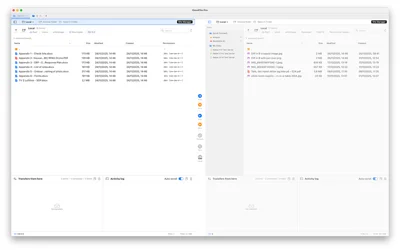
Professional dual-pane interface with Site Manager (click to enlarge)

Find similar images across drives and servers (click to enlarge)
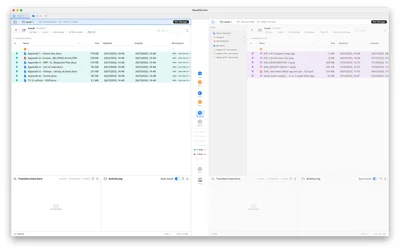
Multi-tab file management with transfers panel (click to enlarge)
Who Is OmniFile For?
Whether you’re a developer, sysadmin, designer, or anyone managing cloud and servers, OmniFile gives you a professional, secure, and efficient file workflow on macOS.
Why OmniFile?
✅ All Major Protocols - FTP, SFTP, S3, B2, Dropbox, Google Drive, OneDrive, and more
✅ Real Multi-Tab - Each tab remembers its own state and queue
✅ Powerful Sync - Bidirectional, one-way, with smart conflict handling
✅ Next-Gen Queue - Cloud-to-cloud transfers with automatic resume
✅ Duplicate Detection - Find duplicates and similar images instantly
✅ Touch ID Security - Optional biometric unlock
✅ Native macOS - Built for Apple Silicon with full system integration
✅ Smart Automation - Queue persistence and resume after restarts
Download
Download OmniFile on Mac App Store
OmniFile - Professional file transfers made simple.